My Library (Saved Sources)
Saved sources from chat & research with full content (never truncated to snippets): year filter, 6 sort options, domain search, and per-source detail pages. Your personal bookshelf — distinct from Library, which stores files.
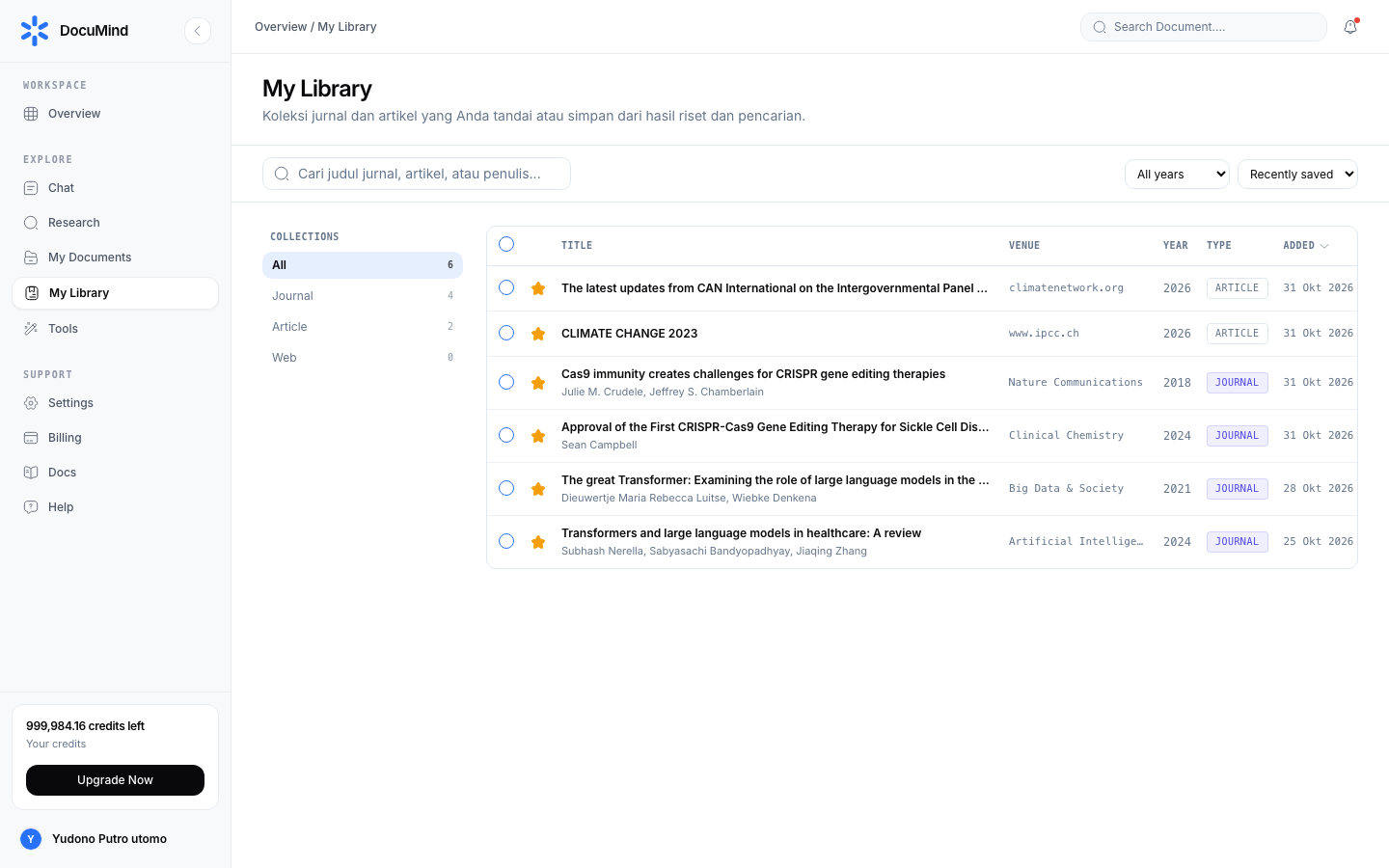
URL: https://www.documind.id/dashboard/my-library
Quick Summary
| Aspect | Details |
|---|---|
| Pages | /dashboard/my-library (list) and /dashboard/my-library/:id (detail) |
| Contents | Full-content SavedSources from chat, Research, Find Journal |
| Filter | Years: All, 2026, 2025, 2024, 2023, Before 2023 |
| Sorts | 6 options (Title A–Z/Z–A, Newest/oldest year, Recently/oldest saved) |
| Badges | journal (DOI/journal), article, web (URL domain) |
List & Filters
- Year filter — All, 2026, 2025, 2024, 2023, Before 2023. Lock the last 2–3 years for state-of-the-art; open all for theoretical foundations.
- 6 sort options — Title A–Z / Z–A (find a specific title), Newest/oldest year (trends vs classics), Recently/oldest saved (resume last reading).
- Type badges — journal (from DOI/journal), article, or web (from URL domain). Prioritize journals for academic citations.
- Search — titles, authors, journals, domains. Search key authors to surface one research group.
- Source cards — title, authors, journal/venue, year, DOI (click to publisher), citation counts when available. Scan 10 seconds per card for fast triage.
Saved-Source Detail
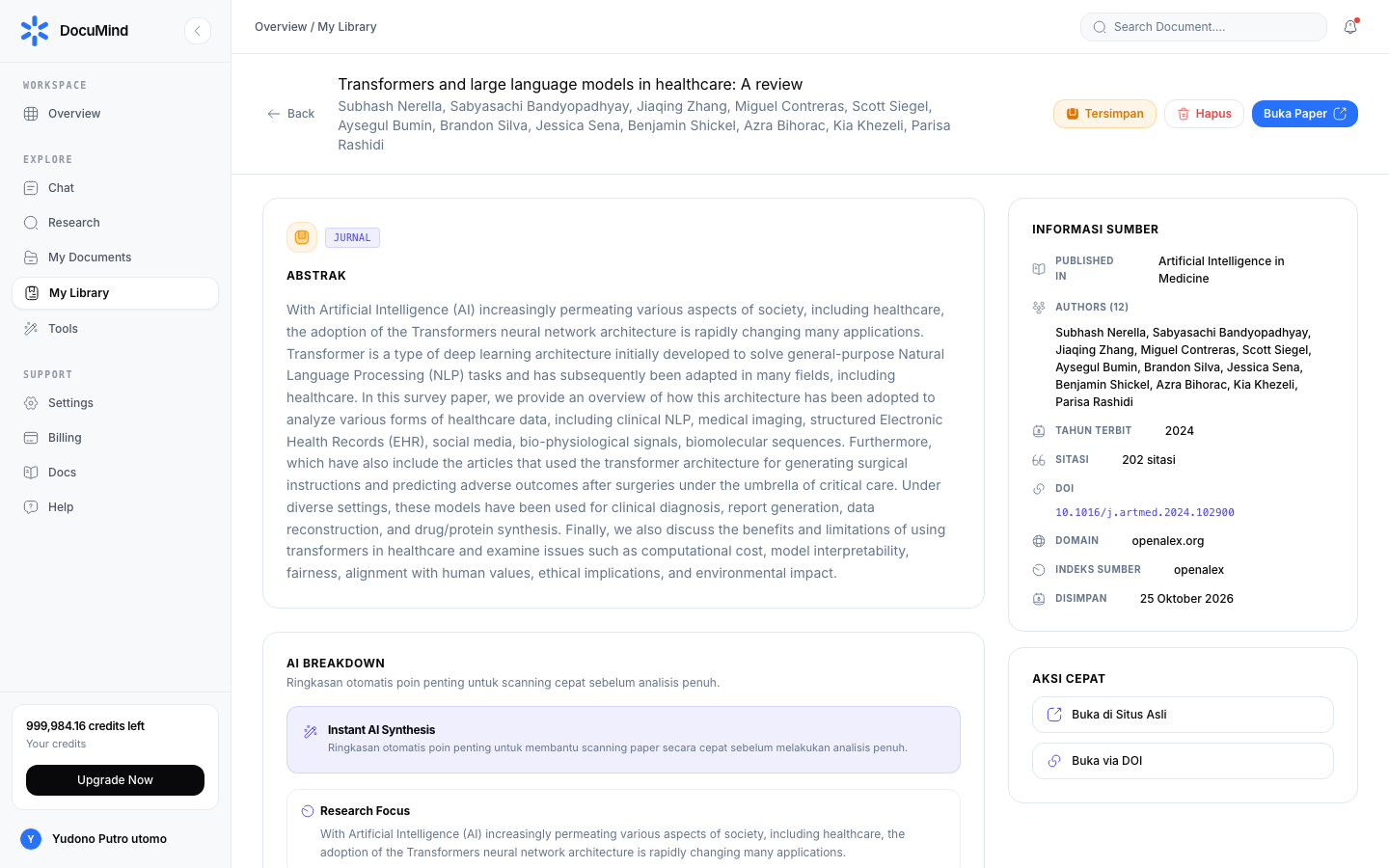
URL: https://www.documind.id/dashboard/my-library/:id
Its parts:
- Full content — title, complete abstract/snippet, authors, journal, DOI, publish date, original URL. Unlike older versions, save pages no longer cut content — the full
contentfield always loads, not justsnippet. - Citation panel — copy citation format, open the DOI, download open-access PDF when available. Always verify DOIs at publishers before bibliography entry.
- Actions:
- Attach to New Chat — bring the source to AI Chat ("compare source A vs B methods").
- Delete — confirmation dialog first; deletion is permanent once confirmed.
- Back to list — breadcrumb navigation without losing filters/sorts.
Real-World Flows
Thesis source bank (2 hrs, once): gather 15 sources from Find Journal + 2 Research reports → all land here automatically/manually → filter 2024–2026 for the trends chapter → sort cited for foundations → attach the best 5 to chat → request a comparison table → write chapter 2 with verified citations.
Team research archive (routine): each member saves findings with tidy titles → "Recently saved" sort for weekly standups → dedupe each sprint end.
Management Tips
- Save on sight, triage later — the Save button on results beats re-searching.
- Read badges first: journals → citation priority; web → extra verification before citing.
- Combine year filter + sort for different chapter needs (trends vs classics).
- Attach at most 3–5 sources per chat session for sharp answers.
- Download open-access PDFs for core sources — archive in Library as offline backup.
My Library FAQ
My Library vs Library — difference? Library stores files (PDF/DOCX/etc.); My Library stores research sources (metadata + full paper/web-article content).
Is content genuinely full? Yes — the full content field always loads, never cut to a snippet.
How do I attach a source to chat? Open source detail → Attach to New Chat → continue Q&A in AI Chat.
Can I search by author/journal? Yes — search covers titles, authors, journals, and domains.
Does deleting a source affect old chats? Past chats using the source stay unchanged; new attachments cannot use deleted sources.
Important Links
- Overview · Authentication · Account · Billing · Landing Page
- Dashboard · AI Chat · Research · Find Journal
- Library · My Library · Tools
Keywords: documind my library, saved sources, save journals, doi citations, paper archive, year filter.